UrVoteproduct design
livesince 2024urvote.ca
- Role: UI UX technologist: product design and front end
- Team: four. Me, a blockchain developer, a full-stack developer and a PM
- Timeline: 2024 to now. The voter import feature took three months and shipped in February 2026
- Platform: web, works down to phone width
- Recognition: 2nd place and Best POC ($22,500), Algorand Startup Challenge 2024
UrVote runs anonymous elections for universities and organisations. Every ballot is recorded on the Algorand blockchain, so a result can be checked by anyone and changed by no one. I’ve designed it since the proof of concept in 2024. This page follows one feature, importing voters into an election split across constituencies, through the three decisions that shaped it.
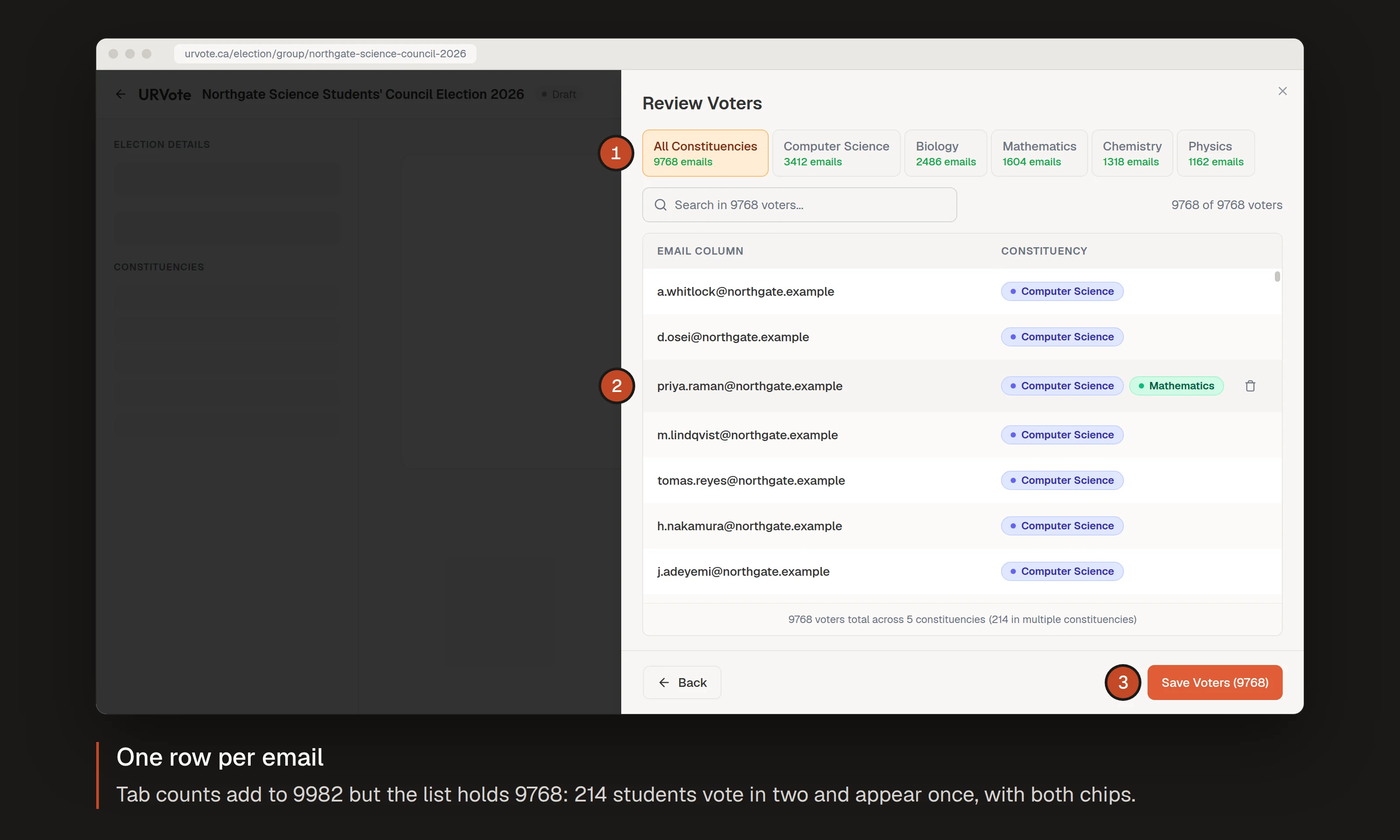
- Constituencies, with counts
- A cross-listed voter, shown once with both chips
- The save
Rebuilt from the shipped code. The university and voters are fictional.
Where it started
UrVote began as a proof of concept for the Algorand Startup Challenge in 2024, where it took 2nd place and Best POC. That version ran one ballot per election: one list of voters, one set of questions, one result. It was enough for a club or a single department, and that’s who used it first.
The problem
Then universities asked for something harder. A faculty council election isn’t one ballot. Each program elects its own representatives, so one election holds a different ballot for each group of voters, shares some questions across them, and rolls up into one result. UrVote calls those groups constituencies.
Two things made it more than a new settings page:
- A voter can belong to more than one constituency. A student in a joint Computer Science and Mathematics program votes in both.
- Mistakes can’t be fixed after launch. Once an election starts, its ballots live on chain. A voter put in the wrong group stays in the wrong group.
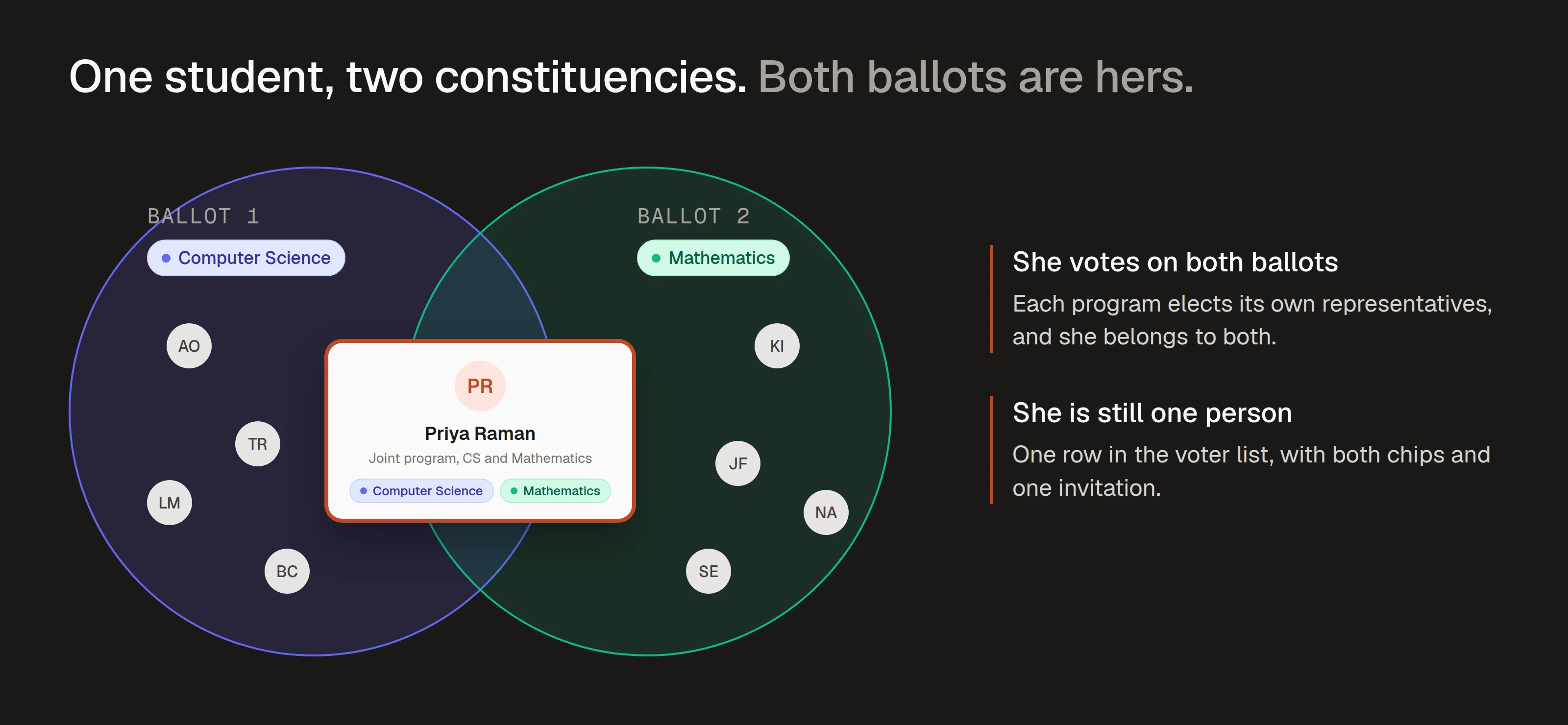
The student and constituencies are fictional.
So the voter list had to be right before the election started, and the admin had to leave the import more confident than they came in.
Who it’s for, and what I heard
The people doing the import are election officers, usually faculty staff running elections on top of their day job. I worked closely with two at the pilot institutions, both already running elections across several programs. Three things stood out:
- Every export is shaped differently. Voter lists come out of each school’s student information system as a CSV, and no two agree. One used short codes like
CSandACC, another full names likeComputer Science, a third paths likeEngineering/Computer Science. Even the email column had a different name each time. - They won’t clean the file. They aren’t data people, and they shouldn’t have to be. Whatever the system exports is what they upload.
- Cross-listed students are real. Joint programs meant some voters legitimately belonged to two constituencies, and the officers had no good way to express that.
That set the principle for the whole feature: the upload does the cleaning; the admin makes the calls.
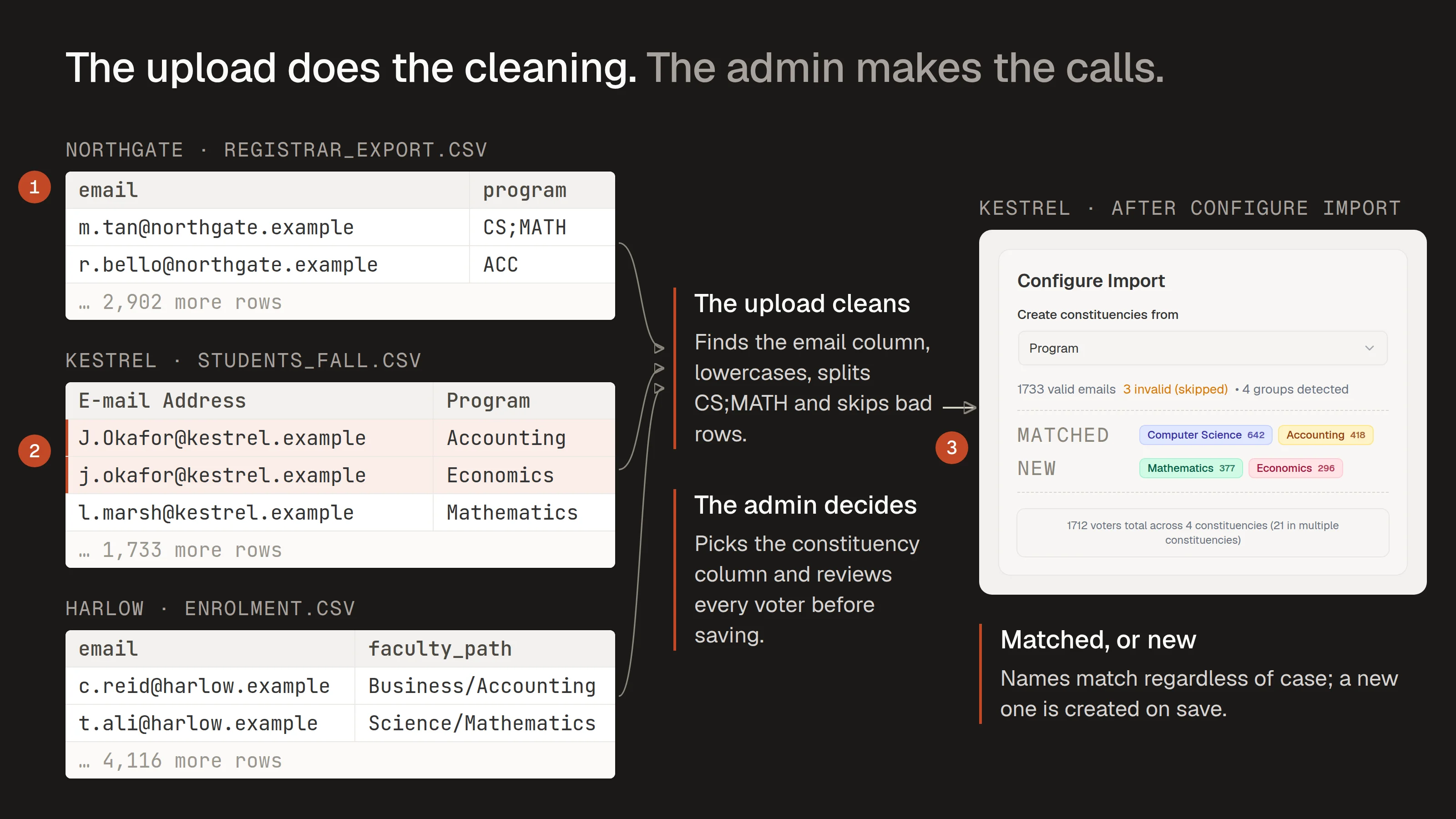
- Three shapes of the same data
- One student in two programs
- One list of constituencies
The file shapes are the ones the pilot officers described. Institutions and students are fictional; 'matched' and 'new' are annotations.
Process: the data model first, then screens
Before I drew a screen, I sat down with our PM and whiteboarded the data model. In a product where launch is permanent, the model decides which mistakes are even possible, so it had to be settled first.
Then Figma: the import wizard’s frames, the dialog primitives, the constituency chip and its palette, and the empty, dragging and error states. Design tokens lived as TypeScript exports that engineers imported directly, so nothing was re-keyed from a redline. The product is Next.js with Tailwind, Radix UI for dialogs and selects, and react-window for long lists.
Decision 1: extend the single-ballot model, don’t replace it
The cleanest design was to rebuild elections around groups, with a single-ballot election as a group of one. It would have meant migrating every live election, and on chain that isn’t something you do lightly.
So we extended instead. A new election group holds the constituencies. Each constituency points to its own ballot, so each ballot stays independent on chain and the group rolls the results up. The link from a ballot to its group is optional, which meant every single-ballot election kept working, untouched.
The cost is permanent: two paths through the code, and the new model has to respect the old one’s edge cases for good. I’d make the same call again, but I’d name that cost on day one instead of discovering it.
The model also changed mid-build. Our first version let a voter belong to one constituency. Cross-listed students in the pilot broke that, and we reworked both the model and the screens so one person can sit in several constituencies and still appear once in the list.
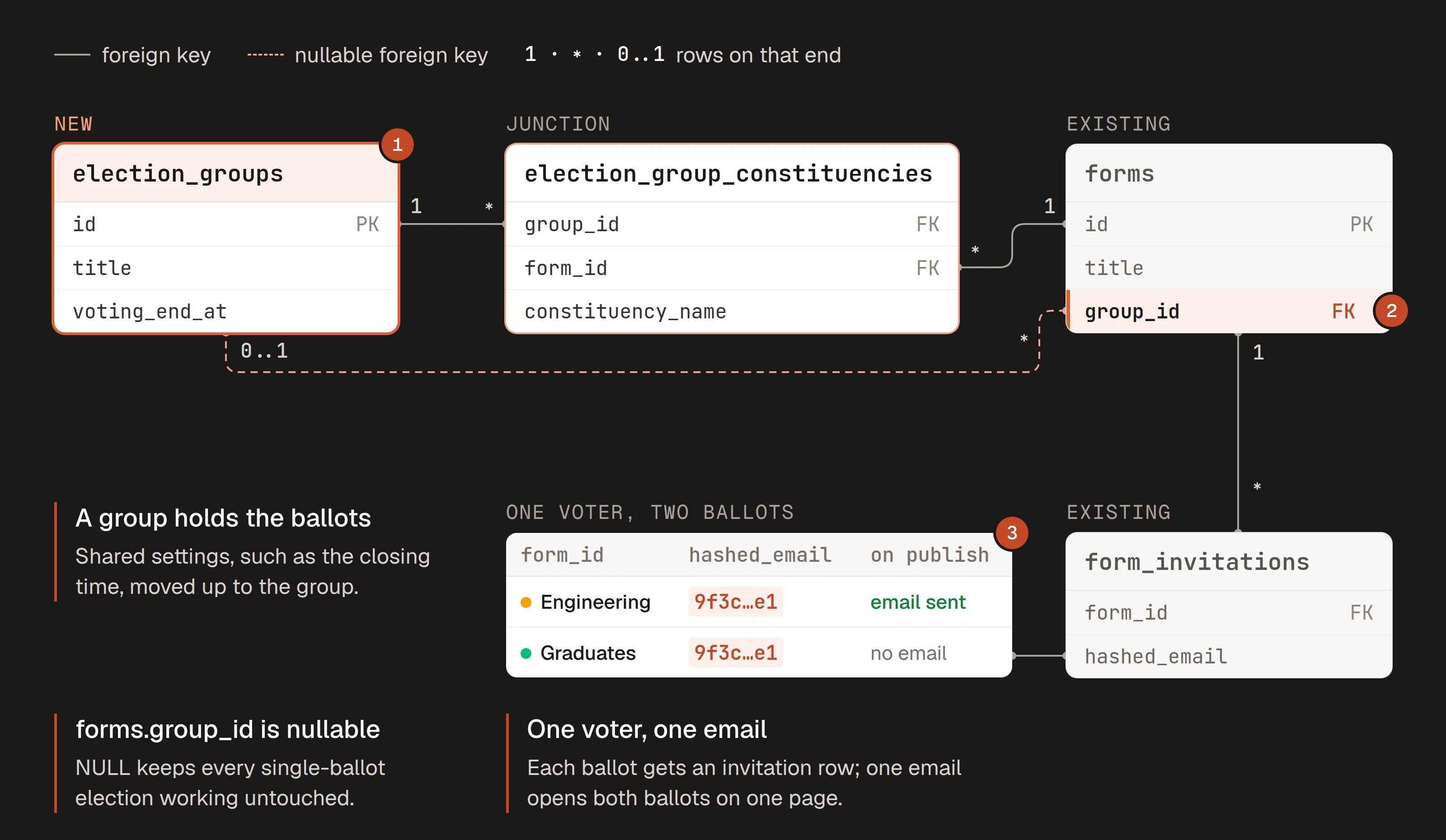
- The new group, holding the ballots
- One optional link on the existing ballots
- A voter in two constituencies: two rows, one email
Simplified from the production migrations; only the key columns are shown.
Decision 2: guess, show the guess, one click to override
The import has to turn a messy file into a correct voter list. I weighed three ways to do it:
- A mapping form that asks everything. Which column is the email, which is the group, what each value means. Reliable, but it hands the data work straight back to the officer.
- Import silently and hope. Fast, until a wrong guess goes on chain.
- Detect, then confirm. The product makes the guesses it can make safely, fills them in, and leaves every one a click away from being changed. The guess it can’t make safely, how to group voters, it asks about.
I chose the third and built the wizard around it, in three steps.
Upload. Drop a CSV, browse for one, or paste a list of emails. A quick read of the first rows decides whether this is a plain list or a file with columns to configure, so the simple case stays simple.
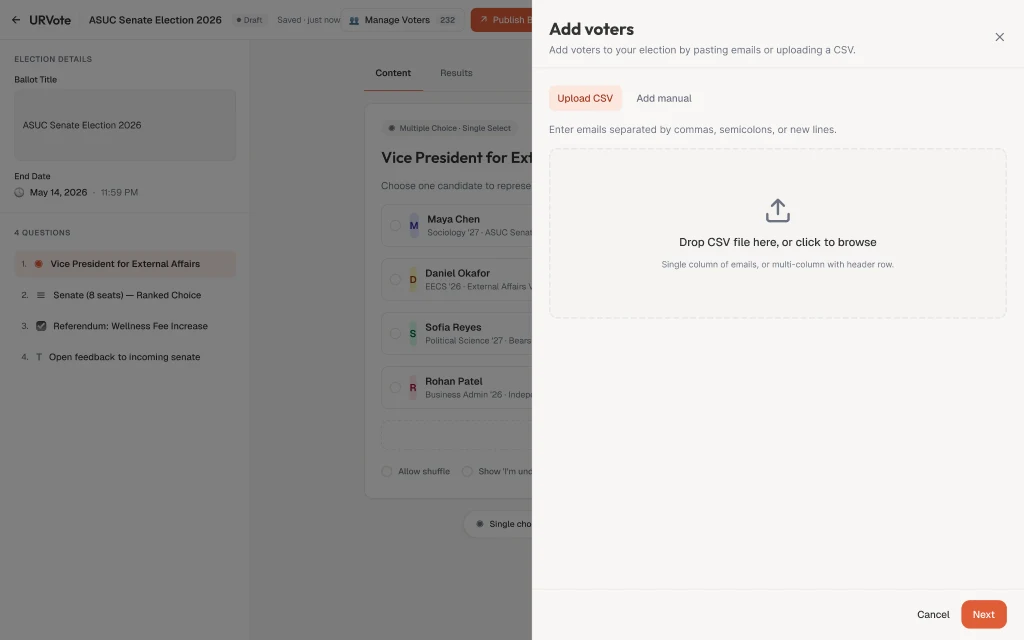
Step 1, Upload. A screenshot of the shipped product with a demo election.
Configure. This is the heart of it. The product finds the email column, by its header if it’s called something like “email” or “E-mail”, otherwise as the column where more than 80% of cells look like addresses, and fills it in. Grouping it never guesses. If the file has other columns, it asks once, in plain words, “Do you want to create constituencies?”, and the officer picks the column to group by. Next stays disabled until there’s an email column, at least one valid email and, if they said yes, a grouping column. A grouping column with empty cells is refused rather than half-imported. A value that matches a constituency the officer already created, ignoring case, joins it and keeps its colour; a new value becomes a new constituency when the list is saved, and a cell like CS;MATH puts the voter in both. Every guess is a dropdown away from being changed, and nothing is saved yet.
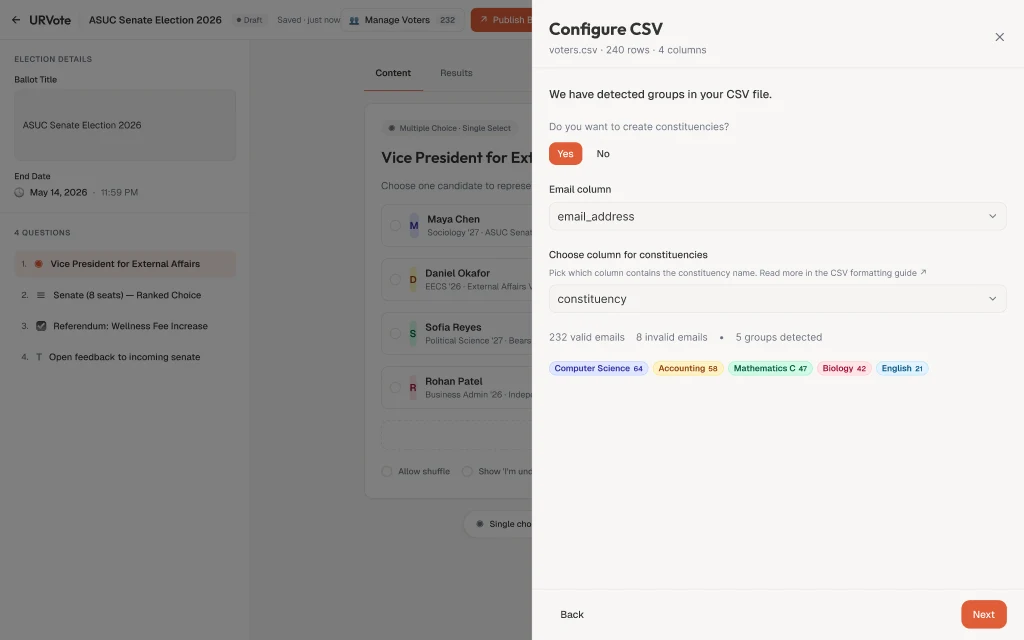
Step 2, Configure. A screenshot of the shipped product with a demo election.
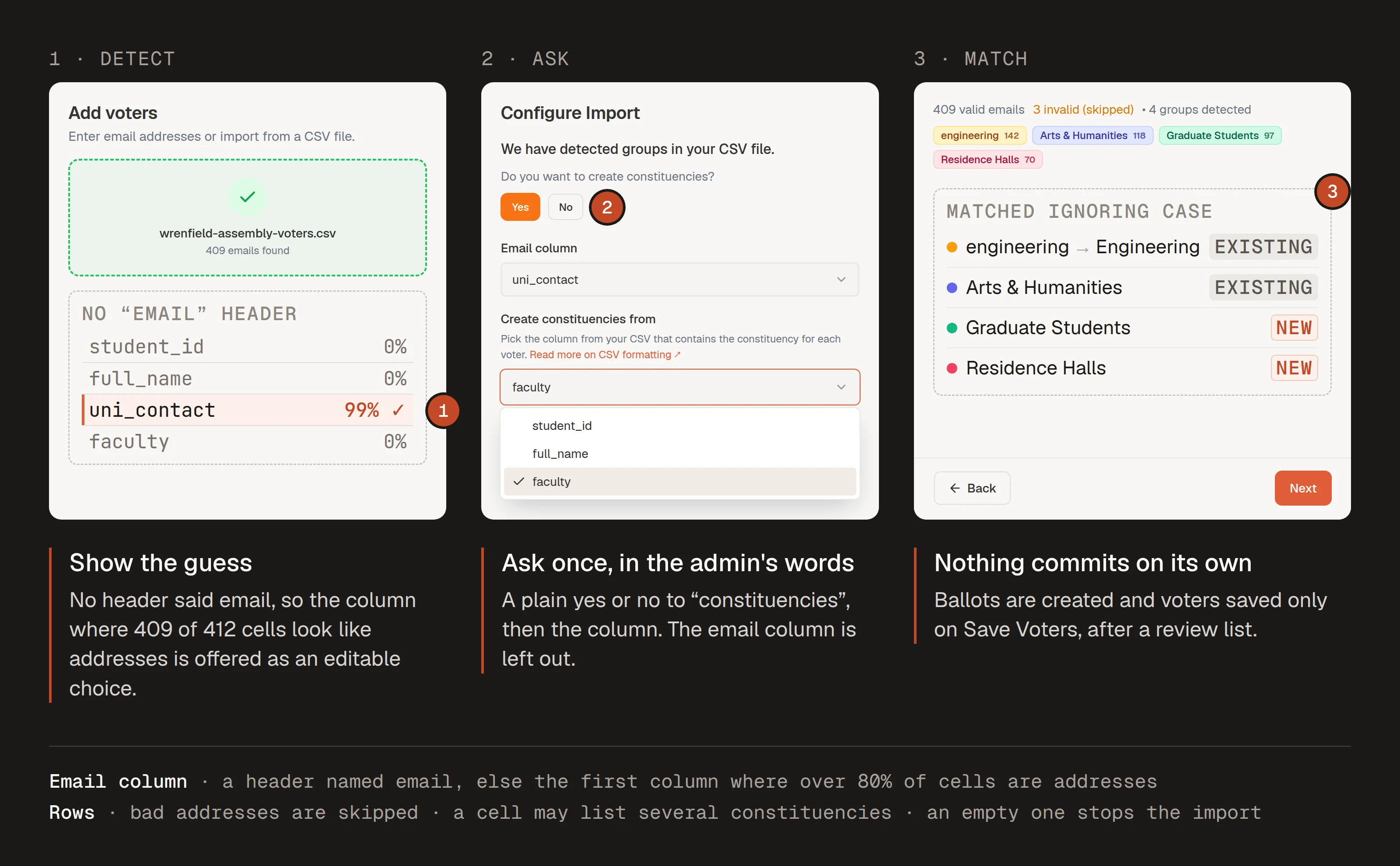
- The email column, found by what is in it
- One question before grouping
- Matched and new, before anything is saved
Rebuilt from the shipped code. The file is fictional; the percentages and the matched/new box are annotations.
Review and save. The whole list, searchable and filterable by constituency, with duplicates removed by email. A voter in two constituencies shows up once, with both chips.
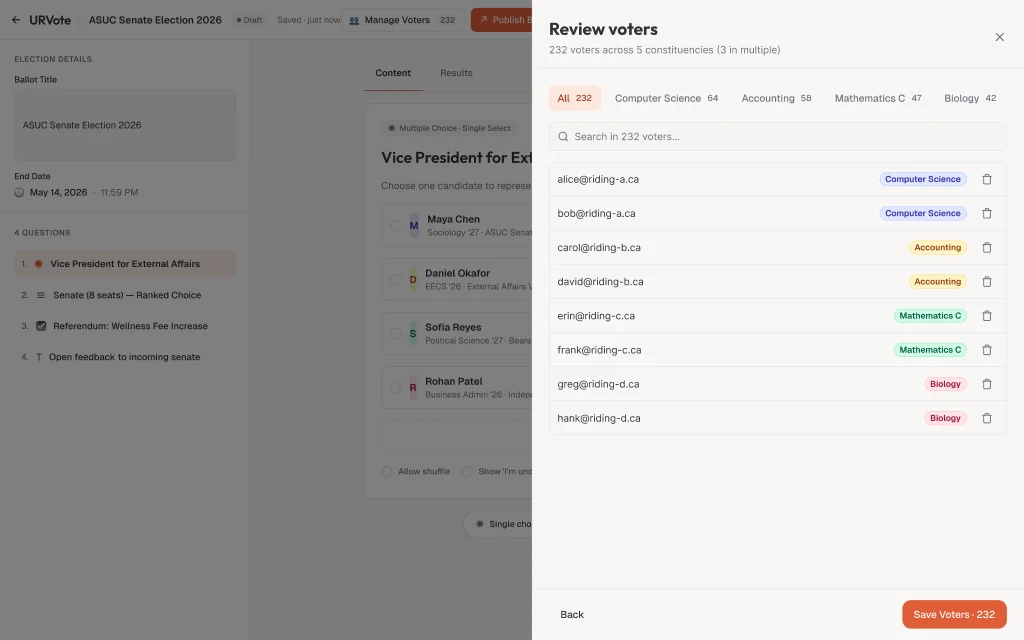
Step 3, Review. A screenshot of the shipped product with a demo election.
Decision 3: the last step is a review, not an “Are you sure?”
An officer saving 10,000 voters has to trust what they’re about to save, and the list has to stay fast while they check it. The review list is virtualized, so only the rows on screen are drawn, and I tested it up to 100,000 rows.
I left out the usual confirmation dialog. A box asking “Are you sure?” gets clicked through without being read. Instead, the review step is the confirmation. Everything the officer needs to judge the save is on that screen: a tab for each constituency with its count, a footer reading, for example, “412 voters total across 3 constituencies (4 in multiple constituencies)”, and the action itself carrying the number, “Save Voters (412)”. Invalid emails were already counted and skipped one step earlier, so nothing on this screen is a surprise.
The button also tells the truth about what it will do. In a draft election, saving only stores the list; no one is emailed. Invitations go out when the election is published, and a voter in two constituencies gets one invitation, not two. Once the election is live, the same button reads “Send Invitations”. Closing the panel with voters not yet saved asks first, “Unsaved voters”, and the focus lands on Cancel, not on “Discard & Close”.
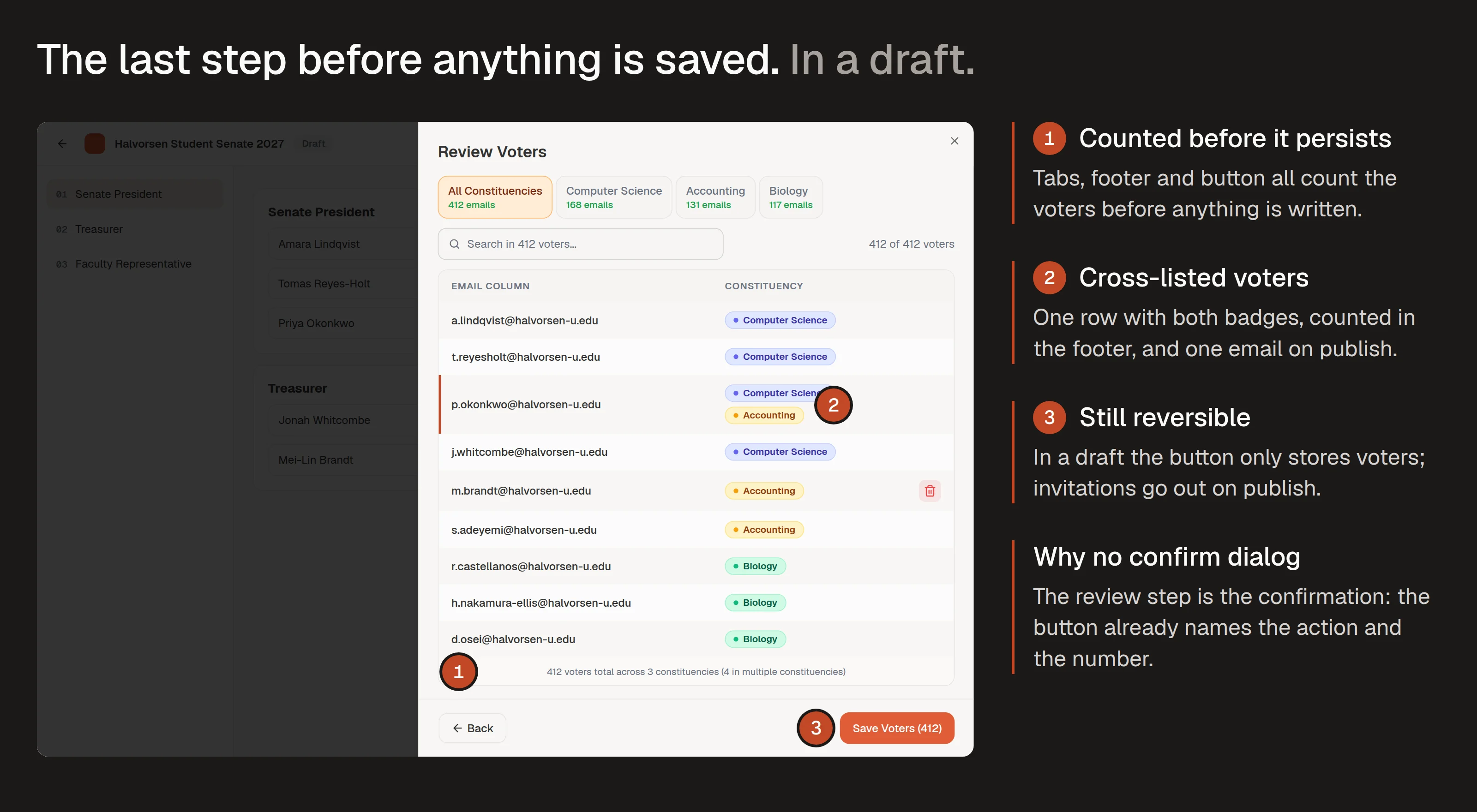
- Counts before anything is saved
- Cross-listed voters, named
- What the save will and won't do
Rebuilt from the shipped code. The election and voters are fictional.
One colour per constituency
Once an election has five or eight constituencies, people find them by colour before they read the name. That only works if a constituency keeps its colour from screen to screen, so I treated colour as a tokens decision, not decoration.
- Eight hues, each a pair. A light background and a dark text shade from the same Tailwind family, so every chip passes AA contrast.
- Assigned by position. A constituency’s colour comes from its place in the election’s list, so the first eight are always distinct. Past eight the palette wraps. Where there’s no list to go by, a hash of the name keeps the colour stable. Existing constituencies keep their colours when new ones arrive in an upload, so nothing changes colour on save.
- Never colour alone. Every chip carries the name. Colour helps you scan; the name is what you read.
A constituency is the same colour from the moment it’s detected in the file, through review, to the saved voter list. The results use a separate palette on purpose: there, colour ranks the choices by votes, which is a different question.
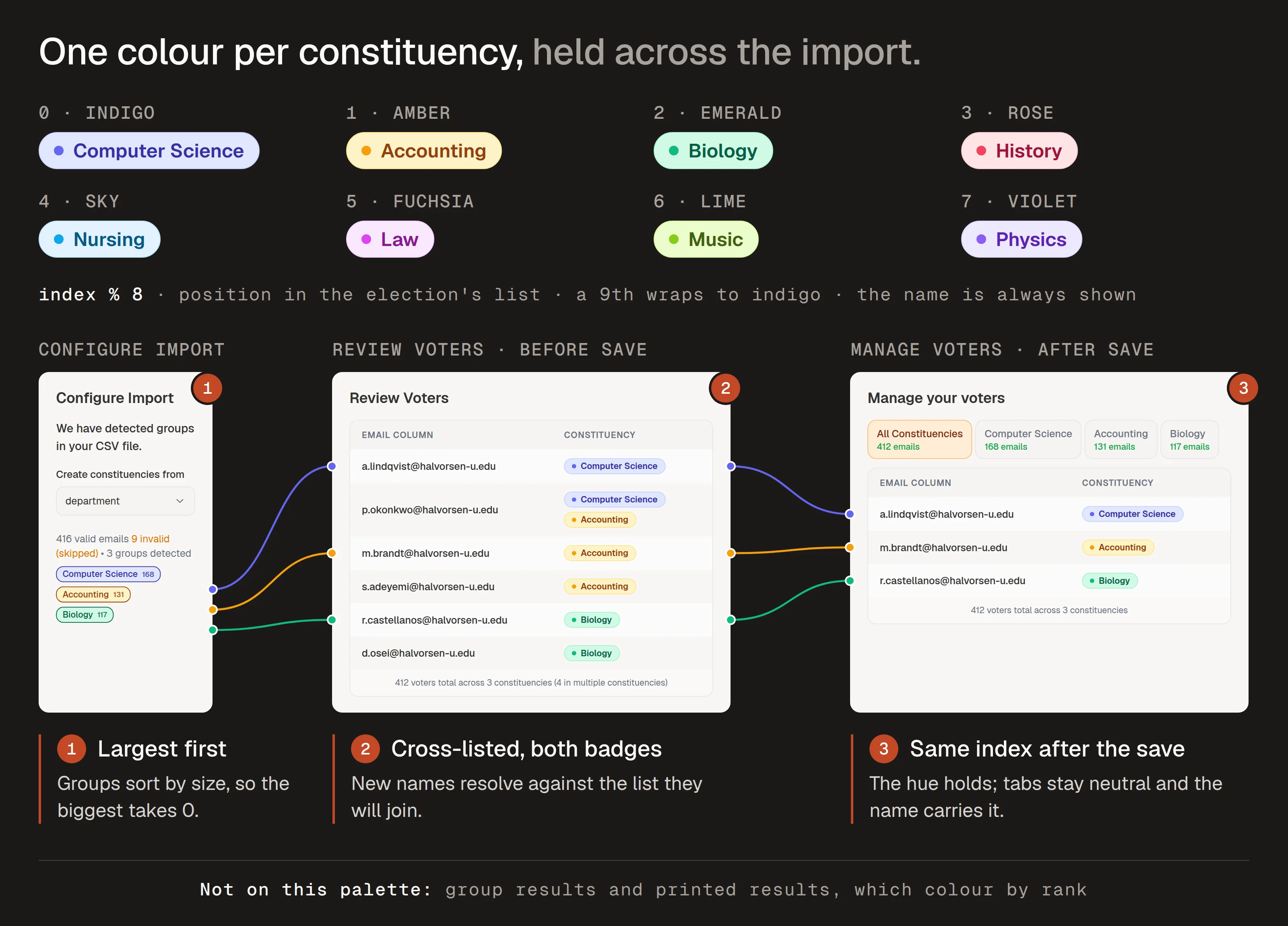
- Assigned by position
- The same hue in review
- The same hue after save
Palette and assignment from the shipped code. Constituencies are fictional.
Accessibility rests on the primitives and on the rules above. The panel, dialogs and selects are Radix, so focus is trapped where it should be and returns when they close. The one destructive prompt focuses Cancel first. And colour never carries meaning by itself.
Results
- 10,000-voter elections ran on it shortly after the feature shipped.
- The pilot officers finished their imports in one sitting, and after launch there were no complaints about voters in the wrong group. Launch being permanent never cost them, because the import caught the mistakes first.
- The list held up at 100,000 rows in testing, well past the largest election so far.
What I’d do next
- Split the Configure step. It handles detection, mapping and grouping on one screen. That kept the wizard short, but I watched both pilot officers pause there. I’d test hiding the mapping until grouping is confirmed.
- Test edge cases against the model before it hardens. Cross-listed students should have come up on the whiteboard, not in the pilot.
- A colour-blind pass on the palette. Names travel with every colour, but I’d still run the eight hues through a simulator before calling it done.
Filed under product design